Tuesday, February 05, 2008

Moulding speakers

In any sound system, the quality of audio depends on the speakers. The best recorded material encoded on the most advanced data storage device and played by top-of-line stereos/ PC and amplifier will sound awful if the system is hooked up with poor speakers. A system's speaker is the component that takes the electronic signal from media storage devices like CDs, tapes and DVDs and turns it back into actual sound.
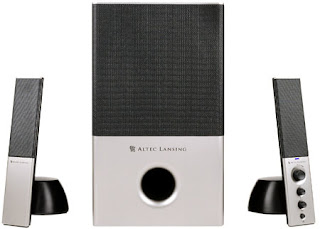
Altec Lansing VS4121
Now when it comes to Pc speakers we have many choices, ranging from two speaker system to eight speaker system. Out of this, three speaker setup (commonly referred to as 2.1 channel) and six speaker setup (commonly referred to as 5.1 channel) are most popular. A primary consideration in deciding between 2.1 and 5.1 speaker sets is whether its music you intend to use on the one hand, or DVD movies and games on the other. 2.1 are suited more ideally for music listening than 5.1 systems. A 2.1 Channel sound uses two stereo speakers, a subwoofer and a special surround sound decoder to create an enveloping surround sound listening experience. 2.1 Channel systems use special decoders to create the illusion of multi channel surround sound effects, commonly known as Virtual Surround Sound (VSS). Various 2.1 channel speakers use 5.1 channel decoders combined with special digital circuits that simulate the sound of rear channel speakers. A good 2.1 speaker set can outperform a 5.1 set in the same price range if mp3 and audio tracks are considered. This is because most music such as on CD is encoded with two channel playback.
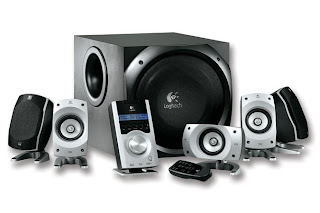
Logitech Z 5500
There are many ways to make and present a sound recording. The simplest method is called monaural or simply mono. Mono means that all the sound is recorded onto one audio track or channel, which is typically played on one speaker. Two-channel recordings, in which sound is played on speakers on either side of the listener, are often referred to as stereo. This isn't entirely accurate, as stereo (or stereophonic) actual refers to a wider range of multi-channel recordings. Surround recordings take this idea a step further, adding more audio channels so sound comes from three or more directions. While the term "surround sound" technically refers to specific multi-channel systems designed by Dolby Laboratories, it is more commonly used as a generic term for theater and home theater multi-channel sound systems. 5.1 channel sounds is for movies-DVD movies and games. DVD movies that use DTS and Dolby Pro Logic II need a 5.1 sound system for proper reproduction of sound. Top brands include CreativeAltec LansingLogitech
For further reading click here.    

Sunday, February 03, 2008

Elements of Dedicated windows hosting


If you do have a big, powerful website that gets lots of visitors and has a tendency to hog resources, then you might want to have a web server all to yourself. Some companies also prefer the extra security of not having to share the server with anyone else who could do something accidentally or on purpose to crash it. Renting the use of an entire server is known as dedicated hosting. The web hosting company still owns the machine and takes responsibility for maintaining the hardware and the web hosting software, but you have greater control over the configuration and use of the server.
If you are looking for a web hosting plan and you are considering getting a Linux-based plan or a Windows-based plan, then there are a couple of things that you need to look at.
If opting for a windows-based hosting we must consider the following features:

1. ASP Support
The obvious reason for opting a windows plan is so that you are going to use languages which are Microsoft-specific.

2. .NET Support
ASP.net is the next generation of the Microsoft's Active Server Page or ASP, which is a feature of the Internet Information Server or IIS. A lot of web hosts provide this feature for free while there are some who charge an additional fee.

3. CDONTS
CDONTS or Collaboration Data Objects for Windows NT Server is a Messaging Component which comes with Windows NT/2000. A hosting plan which is Windows-based without this feature is incomplete.

4. Databases
All windows plans support Microsoft Access 2000 Database. This would do if you are a beginner. However, for the more advanced, MSSQL is a necessity.

5. Database Connection
Make sure that the host has an option in the control panel that allows you to manage and create DSNs.

6. ASP Components
Aside from the default features, there are various third-party softwares, so check the list of the features that are provided by the host.

7. PHP and ColdFusion
ColdFusion is a language web development tool which uses server-side scripting. This is an advanced option and is not provided by all web hosting providers.

8. Control Panel
This would be your website's nucleus. In the CP or Control Panel, you would be able to do anything. From the moment that you would be signing up with a hosting plan, you have to be provided with a CP so that you would be able to easily manage your website.

9. POP3 email IDs and Aliases
An example of a POP3 ID would be name@domain.com. You should be given an ample number of POP3 email IDs - this would depend on the size of your package.

10. FTP Accounts
This would be what you could use to be able to upload all of your files, as well as delete and update them.

11. Backup
Majority of the web hosts use automated backups. However, users usually do not care a great deal about this when they choose their hosting plan. This would be a feature that is just as essential as the other features mentioned here.

12. Web Statistics
The analysis of the visitors of your website plays a big role in your website's success. With a Statistics Application which runs on the backend of the server, you would be able to view this report of visitor statistics.

13. Bandwidth
Make sure that you would be selecting the hosting plan which would be able to provide sufficient bandwidth.

14. Webmail and SMTP
Check if your host would be providing you with webmail so that you would be able to check your email messages using an interface which is web-based.

15. IP
If you have a website which would be requiring SSL Support in the future, then you need to get a dedicated IP.                                         

To read more about webhosting click here                                     


Thursday, January 31, 2008

War of the browsers

Web browsers have become an integral part of our life. We all use browsers to explore the richness of internet. With so many browsers around we always have doubts as which browser to use. In general, we end up using internet explorer which comes embedded with windows. Of the zillions of browsers available today, only a few of them can be considered everlasting. Some of these ‘over the top browsers’ are: Internet Explorer (with its seventh version; aka IE7.0), Opera (latest release being 9.24), Firefox (with its second version), and Netscape. Apple has just released windows version of its famous browser “Safari”.
Internet Explorer 7
Internet Explorer 7.0 is a good browser, for most of the part. Now the best part with internet explorer is that it comes pre-bundled with Windows. The major change with internet explorer 7 is that Microsoft finally moved to tabbed browsing. Anti-phishing technology, an RSS reader are some of the major additions. Although Internet Explorer 7 is a good browser, it still uses the old IE 6 code and doesn’t comply with the new web standards. A slightly more secure version of Internet Explorer 7 is installed in Windows Vista operating system. IE 7 has a built-in Internet search box in the top tier of the interface. The Favorites Center replaces the Favorites sidebar and includes tabs for RSS feeds and History. IE 7 includes zoom technology and the new Clear-type page technology, which Microsoft claims renders page fonts as sharp and clear as those printed on a piece of paper. Printing within IE 7 has also been enhanced; pages are automatically shrunk to fit on the printed page. IE 7 also includes increased malware protection requiring user to opt-in when using Active X components. There are also built-in code protections against Cross-Domain script attacks and malicious URL handling. The rendering engine in IE has also remained unchanged; it still uses the IE 4 web engine. IE 7 includes Microsoft's new “Antiphishing technology”, designed to prevent users from providing personal data to fraudulent Web sites. Although there are many changes with IE 7 but most of them are cosmetic.
Firefox
Released within a week after the public release of Internet Explorer 7, Firefox 2.0 has various enhancements over its successor Firefox 1.5. Many new features available in Firefox 2.0 were already available to user, but as extensions. The new version of Firefox has a few cosmetic changes; the icon and theme of the browser has been changed. Most notable change with the new Firefox browser is the addition of the spell check feature. So, whether it’s writing an email or posting a comment on a forum Firefox will present you with red squiggly when ever a word is misspelled or not in dictionary. Right-clicking on the word will bring up a context menu with spelling suggestions and an option to add the word to the dictionary. The built-in Antiphishing filter, which is on by default prowls pages visited for suspicious characteristics. This feature, updated every half hour, checks against a locally stored list of addresses for known phishing sites. Another great addition to the browser is the session restore feature. Now, after crashing or restarting or adding new extension, Firefox gives you the option of starting over with a new session or starting with the old session. Prior to version 2.0 this feature was available only as an extension. Session restore is smart enough to fill-in user input in some text fields. Firefox 2.0 has support for RSS and Atom and has sports feed preview. It also has the ability to subscribe to feeds as live bookmarks, or through Web services like Bloglines, My Yahoo!, and Google Reader. Opening closed tabs is just another feature added to Firefox 2.0 so if we close a tab by mistake, it can be undone. A major change has been made with the release of Firefox 2.0 and the beta release of the Firefox 3 is already available for download.You can read about Firefox's mobile version here.
Opera
Opera is one of the world’s most renowned browsers. It was the first to offer many of the browser features that we commonly use today, such as tabbed browsing and cookie management. With opera 8, again history was made as it was the first browser to embed phishing prevention tools and site security checks. Unlike Internet Explorer 7 and Firefox 2.0, which had significant browser interface changes, Opera 9's changes are mainly in the areas of management and configuration options. The most valuable addition to the new version of Opera is its search customization feature. Another most appreciated feature of the opera 9 browser is its ability to block selected content from any site. The new site-settings feature made it possible to define controls and settings on a site-by-site basis. Bit-torrent client has also been integrated with the new version of the browser, although the drawback is that if you close the browser the download stops, in contrast to many other bit-torrent clients which are minimized to desktop when closed. A new widgets feature made it possible to download (or create for developers) small pop-up applications that run within the browser. Opera 9 includes many small interface changes and navigation enhancements that will allow users to more quickly open tabs or access specific search sites. Opera 9 also is one of the few browsers out there that can pass the “Web Standards Project's Acid2 standards test”, something that neither Firefox 2.0 nor Internet Explorer 7.0 can yet claim. With the beta release of opera 9.5 full text history search has been added in case you forgot to add bookmark the site.
With release date for internet explorer 8 and Firefox 3 nearing by it’s going to be a tough battle.

Wednesday, January 30, 2008

Brand New Internet Explorer

Who needs Internet Explorer 7 when you can just wait for Internet Explorer 8? According to ActiveWin, Microsoft has already been working diligently on Internet Explorer 7's successor, and there are no plans for the team to stop for a service pack. The Internet Explorer development team will supposedly have the next version ready to go out the door within the next two years.

One Microsoft official at CES has told ActiveWin.com that work has already begun for IE 8, the next version of Internet Explorer, and we can expect to see a final product within 18-24 months. In addition, there are reportedly no plans for an interim service pack, but rather focus completely on the next version, which will compete even more directly with Firefox.

ActiveWin's report is completely plausible, but we weren't able to verify the rumor. Instead, a Microsoft spokesperson told Ars that the company is not prepared to discuss future iterations of the browser.

Microsoft is committed to Internet Explorer and is actively working on the next version of the browser. We are excited about the positive reception Internet Explorer 7 has received and are currently looking at market feedback and customer needs as we work on future versions. However we are not commenting on future plans at this time.

How do you feel about Microsoft skipping out on service packs for Internet Explorer 7 and jumping straight into Internet Explorer 8? As long as the browser is kept as secure as possible, I can't see why that would be a problem. If Microsoft is listening, I'd like to see Internet Explorer 8 be a little more developer-friendly. I use Firefox because of all the wonderful Extensions, but I would consider switching back to Internet Explorer if Microsoft had something even close to comparable. I will say that Add-Ons are definitely a step in the right direction, though.

Read about browser’s ACID test here.

Audiophile: Sound Card

An obscenely large percentage of the world’s population shares the same passion - music. With the introduction of MP3 and file sharing programs most of us now have gigabytes of music collection. No one loves if the bass coming from sub woofer is not powerful enough or the mids are not clear. When it comes to good music a dedicated sound hardware is a must, and when it comes to PC hardware making a good choice becomes really feverish.

With basic PC hardware sound, the first thing we have to decide is a sound card. We get two options here, either we can go with the onboard sound or we can have a dedicated sound card. Onboard sound has improved a lot than what it used to be a few years back. All new generation motherboard comes equipped with at least 6 channel sound as a de facto standard. Latest onboard sound cards are capable of producing 8 channel audio. Intel’s new high definition audio has not only multi stream capabilities but it can also send two or more audio streams to different locations at the same time. This means we can play decent music while voice chatting on net. Another great feature is “jack retasking”, i.e. one jack can have more than once function. The card is smart enough to detect whenever a new device is plugged in. It can change its port functionality if the device is plugged into wrong one. ALC 880 and ALC 880D are also great onboard cards which provide good 7.1 sound. It provides four 24 bit, 2 channel DACs, with sound-to-noise ratio achieving up to 100 dB; making it suitable for high multimedia PCs.
Realtel ALC880
Audiophiles and music lovers often opt for dedicated sound cards. These cards have higher sound-to-noise ratio, higher bit rate and takes off load from CPU. In the area of PC sound card no one beats creative. Creative has a range of dedicated sound cards for music lovers to gamers to enthusiasts. At the low end of the hierarchy we can see “Sound Blaster Live Series”, for the mid section one can opt from the “Audigy” series of cards. For extremists and audiophiles creative has launched “X-Fi” series. The Sound Blaster Live supports up to 7.1 channel surround sound and Creative’s EAX Advanced HD Technology. Audigy series has various cards in its stack from audigy value and to Audigy 4 pro. Audigy value has a sound-to-noise ratio of 100 dB has audio quality of 24 bit/96 kHz .Audigy 2 value is a minor upgrade from the audigy value series. Audigy 2 ZS boasts Ceative’s advanced HD audio quality playback and has sound-to-noise ratio of 108 dB. It is capable of producing DVD Audio at 24 bit/ 192 kHz in stereo or 24 bit/ 96 kHz in 5.1 channel surround. The premium card of the series “Audigy 4 pro” has sound-to-noise ratio of 113 dB and supports recording up to six channels at 24 bit/ 96 kHz. The latest gem in the Creative’s bag is the X-Fi series of cards. In terms of processing power X-Fi series is supposed to have twenty four times more powerful than its predecessor. X-Fi audio processor delivers an "Active Modal Architecture" that allows, to switch between one of three modes (Gaming, Entertainment & Audio Creation) available. Various variants of card are: “X-Fi Xtreme Audio”, “X-Fi Xtreme Music”, “X-Fi platinum”, “X-Fi Fatal1ty”, and “X-Fi Elite Pro”. The Fatal1ty and Elite Pro series has an onboard X-Ram of 64 Mb. Platinum, Fatal1ty and Elite Pro connects to an external hub and comes bundled with a remote control.
Creative X-Fi Elite Pro
Whether it’s just for music or for meeting the requirements of the top end games, sound cards (both onboard and dedicated) deliver top performance whenever asked for.For more reading visit here
 
Blog Information Profile for nandananushil1
Google