Search engine optimization or SEO can be defined as a strategy that focuses on improving traffic quality to a website from various search engines through organic search results. As a general rule, a website that appears at the top of a search engine result would have higher hits. There are a number of search types that Search Engine Optimization can focus on viz. local search, image, local search, and industry-specific search.
SEO explains the working methodology of search engines and search patterns of Internet users. Website optimization encompasses three major factors: content editing, HTML editing and coding. Black Hat SEO techniques, also known as Spamdexing, should be avoided by all means. Search Engines ban websites that employ black hat seo techniques.
Monday, August 24, 2009


Monday, February 18, 2008
Windows Vista SP 1
Microsoft has always been releasing service packs for its windows operating systems to fix minor glitch and add various features. A little more than a year after its release, on February 4, 2008 Microsoft released Windows Vista Service Pack 1(SP1). The newly released Service pack may solve some of the performance glitches that have annoyed Vista users. Service Pack 1 will be available to current Windows Vista users by mid-March via Windows update. The corporation is also planning to have SP1 integrated into Windows Vista at retail as well, but there is no given timeline on how quickly it will be done. Windows Vista SP1 will arrive in one of three ways. Most users will automatically receive the update via Windows Update. Users with limited or no Internet connectivity or who need to update more than one PC will be able to download a complete image of Windows Vista SP1 via DVD. And, finally, volume license customers (enterprises) will receive an integrated DVD media package for installation on new PCs.
What’s good with Windows Vista SP1 is that it improves the overall upgrade process, fixes hundreds of tiny problems, and makes it easier for third-party vendors to write stable code for Vista, but failed to significantly increase performance.
SP1 doesn't resolve some of the most annoying flaws in Vista, including slow start-ups and reboots, and a security system that nags you too much and requires add-on anti-virus software.
For further readingWhat’s good with Windows Vista SP1 is that it improves the overall upgrade process, fixes hundreds of tiny problems, and makes it easier for third-party vendors to write stable code for Vista, but failed to significantly increase performance.
SP1 doesn't resolve some of the most annoying flaws in Vista, including slow start-ups and reboots, and a security system that nags you too much and requires add-on anti-virus software.
Link 1
Link 2
Thursday, February 14, 2008
The Big Daddy Of Internet Security Suites
Kaspersky is another one of the many anti-virus makers that’s gone the complete Internet security system way—not a Bad thing. The suite takes care of all your security worries—files, mail, system network security, etc. All the basic controls for the components can be accessed from the main two-pane layout window.
Modifying settings means you go to another window which houses all the settings for the components, and there are plenty of them. The core anti-virus feature is standard and allows you to scan files and folders along with boot sectors, Registry, memory, startup programs, etc. The Anti-spam has a nifty training feature that learns by looking at mails in your mailbox through a Wizard to provide more accurate spam protection. The firewall monitors for incoming and outgoing threats and notifies you immediately. Any attacks targeted at your computer can be set to have the attacker’s machine blocked for a set period of time. The firewall also takes care of the blocking of ad banners and pop-ups from Web sites as well. The parental control is useful in not only stopping access to inappropriate sites, but also in setting limitations on time spent at the computer and on the Internet. User accounts on Windows can be set to Parent, Teenager, or Child and by default, all users are set to Child. Strictness of all the features can be adjusted using a slider. At the same time, manual changes can be made. This is especially useful for spam filtering, parental control and the firewall. Heuristic scanning is available in most of the modules, but not enabled in all of them by default. The help file doesn’t carry any screenshots, but the explanation is adequate and easy to understand.
Kaspersky’s Internet Security Suite is a pretty good choice for anyone looking for a complete security solution—it’s right up there with the best security suites money can buy. There are no missing features, and everything is implemented well. New users might be a little confused by all the terms and huge list of options, though.
More about Kaspersky here.
Modifying settings means you go to another window which houses all the settings for the components, and there are plenty of them. The core anti-virus feature is standard and allows you to scan files and folders along with boot sectors, Registry, memory, startup programs, etc. The Anti-spam has a nifty training feature that learns by looking at mails in your mailbox through a Wizard to provide more accurate spam protection. The firewall monitors for incoming and outgoing threats and notifies you immediately. Any attacks targeted at your computer can be set to have the attacker’s machine blocked for a set period of time. The firewall also takes care of the blocking of ad banners and pop-ups from Web sites as well. The parental control is useful in not only stopping access to inappropriate sites, but also in setting limitations on time spent at the computer and on the Internet. User accounts on Windows can be set to Parent, Teenager, or Child and by default, all users are set to Child. Strictness of all the features can be adjusted using a slider. At the same time, manual changes can be made. This is especially useful for spam filtering, parental control and the firewall. Heuristic scanning is available in most of the modules, but not enabled in all of them by default. The help file doesn’t carry any screenshots, but the explanation is adequate and easy to understand.
Kaspersky’s Internet Security Suite is a pretty good choice for anyone looking for a complete security solution—it’s right up there with the best security suites money can buy. There are no missing features, and everything is implemented well. New users might be a little confused by all the terms and huge list of options, though.
More about Kaspersky here.
Friday, February 08, 2008
Pull Her Dog Tags Mate......
XFX’s “serious gamer” Alpha Dog Edition is here, featuring all the 128 shader units it’s supposed to. The only thing that distinguishes this card from the GTX/ Ultra models is the 256 bit memory interface. The card features a core factory overclocked to 678 MHz (the default core speed is 650 MHz), and here’s where the fun begins- the core is now faster than an 8800 GTX, and the scores show it. Shader clocks are also up to 1700 MHz from the default 1625 MHz. Of course the 8800 GTS Alpha Dog still has restriction of 16 ROPs (Raster Operations), as opposed to the 24 ROPs on GTX/ Ultra cards.
Nevertheless this card has some serious horsepower, and runs noticeably cooler than 8800 GTX and Ultra cards; it’s a little shorter, too- 9.5 inches as opposed to 11 inches on the older cards. Priced lower than its older sibling, running cooler and basically having less power requirements seems like the XFX 8800GTS 512 Alpha Dog Edition has all the accolades in its kitty. Lost planet is a sweet bundle. At $ 300, the XFX is costly now. Yes its $ 125 cheaper than the GTX series of GPUs but the new 8800GT core changes things considerably. Eighty-five percent of the performance at nearly sixty percent price! This card is a mite too expensive to be of any use to the discerning gamer who will likely buy two 8800 GTs for a little more than the price of a single 8800 GTS, and use them in an SLI setup.

Specifications: Core clock: 678 MHz, Shader clock: 1700 MHz, Memory clock: 986 MHz, Memory interface: 256 bit, Memory bandwidth: 63.1 GB/s, Shader units: 128
Nevertheless this card has some serious horsepower, and runs noticeably cooler than 8800 GTX and Ultra cards; it’s a little shorter, too- 9.5 inches as opposed to 11 inches on the older cards. Priced lower than its older sibling, running cooler and basically having less power requirements seems like the XFX 8800GTS 512 Alpha Dog Edition has all the accolades in its kitty. Lost planet is a sweet bundle. At $ 300, the XFX is costly now. Yes its $ 125 cheaper than the GTX series of GPUs but the new 8800GT core changes things considerably. Eighty-five percent of the performance at nearly sixty percent price! This card is a mite too expensive to be of any use to the discerning gamer who will likely buy two 8800 GTs for a little more than the price of a single 8800 GTS, and use them in an SLI setup.

Specifications: Core clock: 678 MHz, Shader clock: 1700 MHz, Memory clock: 986 MHz, Memory interface: 256 bit, Memory bandwidth: 63.1 GB/s, Shader units: 128
Tuesday, February 05, 2008
Moulding speakers
In any sound system, the quality of audio depends on the speakers. The best recorded material encoded on the most advanced data storage device and played by top-of-line stereos/ PC and amplifier will sound awful if the system is hooked up with poor speakers. A system's speaker is the component that takes the electronic signal from media storage devices like CDs, tapes and DVDs and turns it back into actual sound.
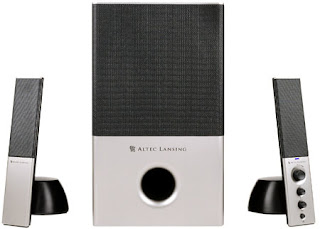
Now when it comes to Pc speakers we have many choices, ranging from two speaker system to eight speaker system. Out of this, three speaker setup (commonly referred to as 2.1 channel) and six speaker setup (commonly referred to as 5.1 channel) are most popular. A primary consideration in deciding between 2.1 and 5.1 speaker sets is whether its music you intend to use on the one hand, or DVD movies and games on the other. 2.1 are suited more ideally for music listening than 5.1 systems. A 2.1 Channel sound uses two stereo speakers, a subwoofer and a special surround sound decoder to create an enveloping surround sound listening experience. 2.1 Channel systems use special decoders to create the illusion of multi channel surround sound effects, commonly known as Virtual Surround Sound (VSS). Various 2.1 channel speakers use 5.1 channel decoders combined with special digital circuits that simulate the sound of rear channel speakers. A good 2.1 speaker set can outperform a 5.1 set in the same price range if mp3 and audio tracks are considered. This is because most music such as on CD is encoded with two channel playback.
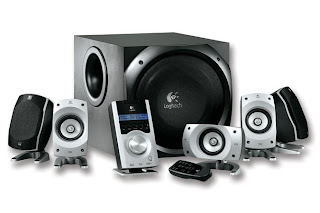

Now when it comes to Pc speakers we have many choices, ranging from two speaker system to eight speaker system. Out of this, three speaker setup (commonly referred to as 2.1 channel) and six speaker setup (commonly referred to as 5.1 channel) are most popular. A primary consideration in deciding between 2.1 and 5.1 speaker sets is whether its music you intend to use on the one hand, or DVD movies and games on the other. 2.1 are suited more ideally for music listening than 5.1 systems. A 2.1 Channel sound uses two stereo speakers, a subwoofer and a special surround sound decoder to create an enveloping surround sound listening experience. 2.1 Channel systems use special decoders to create the illusion of multi channel surround sound effects, commonly known as Virtual Surround Sound (VSS). Various 2.1 channel speakers use 5.1 channel decoders combined with special digital circuits that simulate the sound of rear channel speakers. A good 2.1 speaker set can outperform a 5.1 set in the same price range if mp3 and audio tracks are considered. This is because most music such as on CD is encoded with two channel playback.

There are many ways to make and present a sound recording. The simplest method is called monaural or simply mono. Mono means that all the sound is recorded onto one audio track or channel, which is typically played on one speaker. Two-channel recordings, in which sound is played on speakers on either side of the listener, are often referred to as stereo. This isn't entirely accurate, as stereo (or stereophonic) actual refers to a wider range of multi-channel recordings. Surround recordings take this idea a step further, adding more audio channels so sound comes from three or more directions. While the term "surround sound" technically refers to specific multi-channel systems designed by Dolby Laboratories, it is more commonly used as a generic term for theater and home theater multi-channel sound systems. 5.1 channel sounds is for movies-DVD movies and games. DVD movies that use DTS and Dolby Pro Logic II need a 5.1 sound system for proper reproduction of sound. Top brands include Creative, Altec Lansing, Logitech.
For further reading click here.
For further reading click here.
Subscribe to:
Posts (Atom)

